| Nick Shulman responded: |
2025-12-04 10:44 |
If you send us your files we can try to figure out what is going on.
You can put all of your files into a .zip file and upload them here:
https://skyline.ms/files.url
It would also be helpful if you could show us some screenshots so that we can see what settings you are using when you use the "File > Search > Feature Detection" menu item.
It would also be helpful if you could send us your Skyline document. In Skyline you can use the menu item:
File > Share
to create a .zip file containing the Skyline document and supporting files.
That Skyline document is likely to be empty, but it might be helpful for you to send it to us just in case it makes a difference.
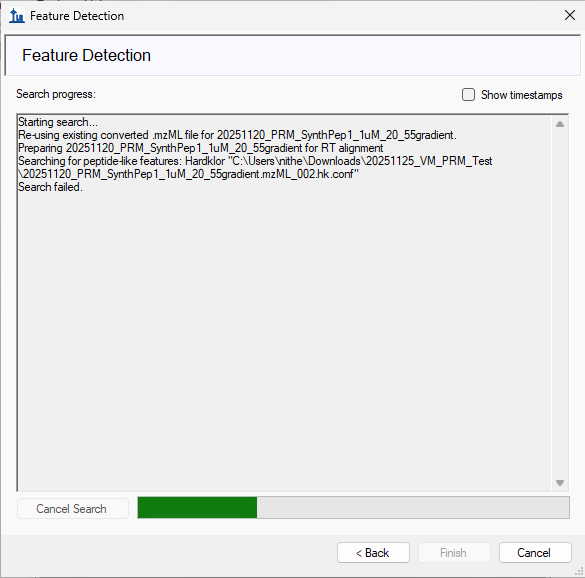
If you are seeing any sort of output when you get your error, it would also be helpful for you to send us the text of that output.
-- Nick |
| |
| nitheshperumal responded: |
2025-12-05 15:11 |
Hi Nick,
Thank you for the prompt response. I have uploaded the skyline document (20251205_NP_FeatureDectection) for you to review. When running the Feature Detection search I get an error message saying search failed and the search never completes (I manually cancel after waiting for awhile - attached screenshot to this message). In terms of settings I am using the same settings for the peptides and transitions as I do for importing searched results, which end up working as anticipated.
Let me know if there's any additional files or information I can provide to help with the troubleshooting.
Thanks,
Nithesh Perumal |
|
| |
| Nick Shulman responded: |
2025-12-05 15:32 |
Can you send us the file that you were trying to search?
That would be "20251120_PRM_SynthPep1_1uM_20_55gradient" or something.
You can upload it here:
https://skyline.ms/files.url
-- Nick |
| |
| nitheshperumal responded: |
2025-12-08 11:36 |
Hi Nick,
Sorry for the delay, just uploaded the input spectra file (name: 20251120_PRM_SynthPep1_1uM_20_55gradient.raw).
Thanks,
Nithesh Perumal |
| |
| Brian Pratt responded: |
2025-12-08 13:29 |
Hi Nitesh,
Feature Finding works on MS1 data, but it appears that your data is MS2 only. I'm wondering why there's no MS1 scans?
Brian Pratt |
| |
| nitheshperumal responded: |
2026-02-12 12:58 |
Apologies for the delayed response.
I initially didnt have MS1 acquisition, but have since added and reacquired the data. I am seeing this error thats is failing to find a required column "Averagine". I have attached a screenshot of the exact error message as a PDF. |
|
| |
| Brian Pratt responded: |
2026-02-12 14:11 |
Can you provide your current Skyline document, and an example of your MS1-containing data?
Thanks
Brian |
| |
| nitheshperumal responded: |
2026-02-12 15:28 |
I uploaded the skyline document and MS1-containing data example to this folder: https://skyline.ms/files.url as a zip file named MS1_data_error.zip.
Thanks,
Nithesh Perumal |
| |
| Brian Pratt responded: |
2026-02-12 20:59 |
Hi Nitesh,
I think it's just that your settings aren't appropriate. Have a look at the attached to see the settings I used - they are probably still not 100% correct for your actual data acquisition but they do yield a result.
Brian Pratt |
|
| |
| nitheshperumal responded: |
2026-02-18 16:36 |
Hi Brian,
Thanks for the response, I believe I was able to figure out the discrepancy with your example and have it working now. Thank you for assisting me with this issue.
Thanks,
Nithesh Perumal |
| |
 Feature_Detection_Screenshot.png
 MS1_FeatureExtraction_Error.pdf
 MS1_mass_test_bsp.sky.zip